Source workflow verified: August 29, 2026
Robinhood provides automated account statements and custom account activity reports in account settings. Statements are best for fixed monthly records, while custom reports let you choose accounts, activity types, and dates for reconciliation.

Statement or custom report?
| Record | Best for | Limitation |
|---|---|---|
| Monthly statement | Balances, positions and account activity for a statement period | Fixed period and format |
| Custom activity report | Selected accounts, activity types and dates | Filters can omit relevant rows |
| Tax document | Applicable annual tax reporting | Not a complete transaction history |
| Trade confirmation | Details of an individual execution | Not a consolidated history |
How to download a Robinhood statement
- Sign in to the official Robinhood app or website.
- Open Account and the menu.
- Select Reports and statements or the equivalent documents area.
- Choose the relevant account and statement month.
- Download the PDF and verify its account and period.
If you need annual forms instead, follow our Robinhood tax-document guide.
Create a custom account activity report
Select the accounts, activity types, start date and end date offered by Robinhood. Begin with a broad report when the recipient has not specified filters. Keep the generated original, then make a separate working copy for sorting or annotation.
For a calendar-year review, set January 1 through December 31 and check that the result actually includes both boundary dates. If an accountant requests deposits, withdrawals, dividends, trades, or fees separately, retain the broad report and generate filtered working versions instead of repeatedly changing one file.
If records appear incomplete
- Check brokerage, retirement, managed, joint, crypto and card products separately where applicable.
- Remove narrow activity filters and widen the date range.
- Download adjacent statement months for boundary dates.
- Distinguish orders from executed trades and pending from completed transfers.
- Use official support when a statement conflicts with visible account activity.
Also compare the opening and closing balances of consecutive monthly statements. A mismatch can reveal that the wrong account or month was selected. Transfers between your own accounts can create entries on both sides and should not be deleted as duplicates without reviewing their descriptions and dates.
Validate a complete statement set
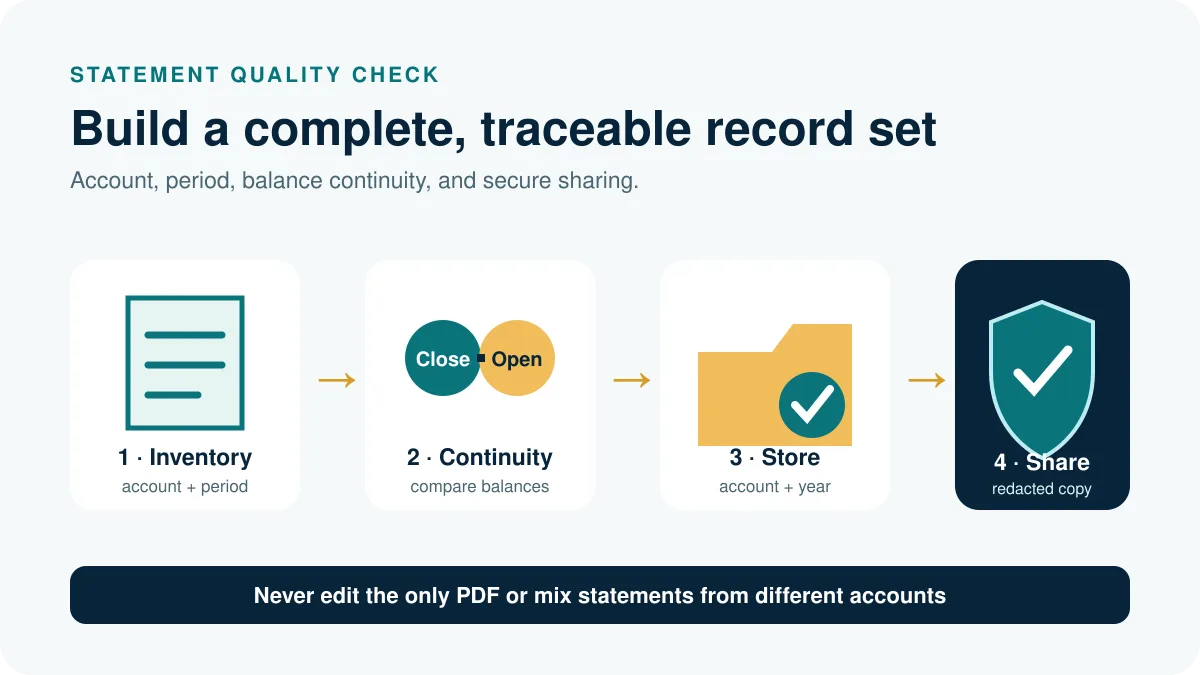
Build an inventory before merging or sharing files. Record account type, masked account number, statement month, opening balance, closing balance, and download date. For each account, confirm that every requested month appears once and that one statement’s closing balance agrees with the next statement’s opening balance after considering any documented adjustments.
- Separate brokerage, retirement, managed, joint, crypto, and other products.
- Sort monthly PDFs by the period printed inside the statement, not merely the file-creation date.
- Check the first and last page count and confirm the PDF opens completely.
- Compare a sample trade, dividend, deposit, and withdrawal with visible account activity.
- Record missing months before generating custom reports.
A statement set can be complete even when one quiet account has no document for a month under the provider’s statement rules. Confirm the account’s activity and official support guidance rather than fabricating a blank statement.
Use custom reports without hiding activity
Generate one broad custom activity report as the master working source, then create filtered copies for the recipient. Record the selected accounts, activity types, start and end dates, and generation time. If the request crosses December 31 or an account transfer, compare adjacent statements and include settlement activity that may complete after the trade date.
Do not deduplicate solely by symbol, amount, or date. An order, execution, fee, dividend, transfer, and reversal can be related but distinct records. Use unique identifiers and descriptions where supplied, and keep a source-file column when combining exports.
Store and share Robinhood records safely
Keep untouched statements and reports in a private folder organized by account and year. Create a redacted sharing copy only after confirming what the accountant, lender, or auditor actually needs. Remove unnecessary account numbers or positions from the copy, but do not alter source records that may later be needed for reconciliation.
Use filenames containing the account type and statement period, and keep a short inventory beside the files. If a report is regenerated with different filters, preserve both versions and record the reason; otherwise two similarly named downloads can silently replace one another.
Frequently asked questions
Are Robinhood statements generated automatically?
Robinhood says account statements are automated based on account activity and statement rules.
Can I choose custom dates?
Use a custom account activity report for the available date and activity filters.
Does one report include every Robinhood product?
Do not assume so. Select and verify every relevant account or product.
Can I access records after deactivation?
Robinhood says account records remain viewable after an account is deactivated or transferred, subject to account access.
Document types and access guidance were checked on August 29, 2026.