Source workflow verified: August 29, 2026
Robinhood tax documents are available in the Tax Center when a form applies to your account and tax year. Your document set may cover brokerage, retirement, or crypto activity, and a consolidated 1099 can contain several sections.
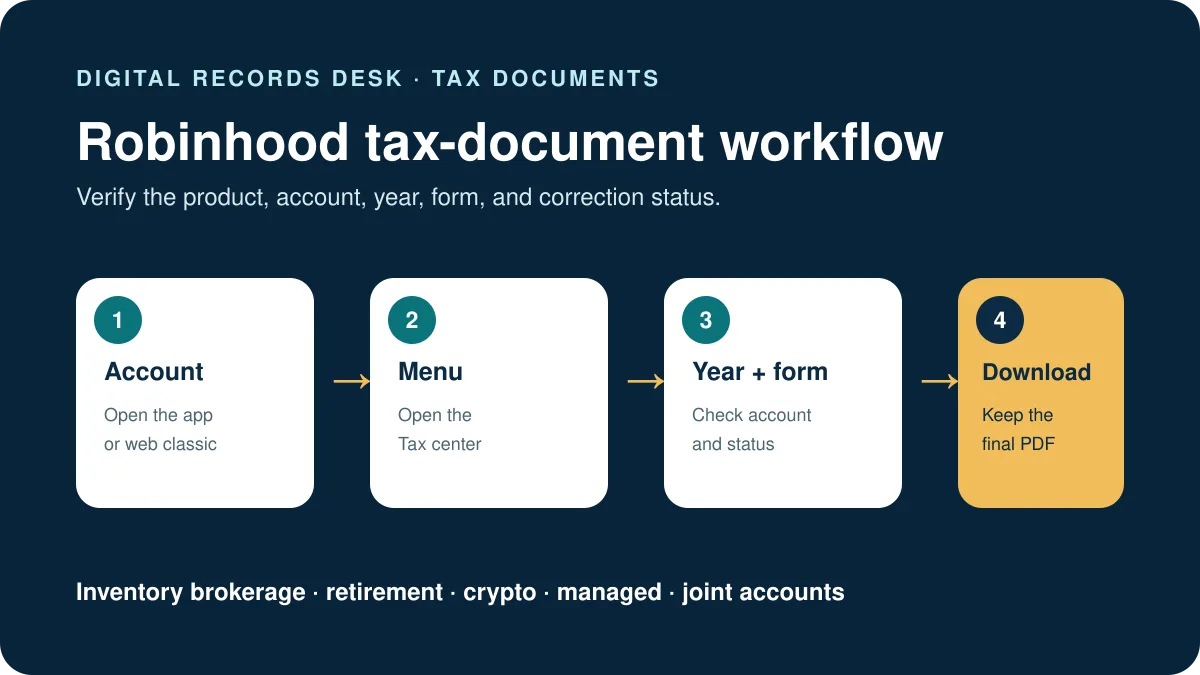
How to download Robinhood tax documents
Robinhood app
- Open Robinhood and select the person-shaped Account icon.
- Select the three-bar Menu.
- Choose Tax center.
- Select the tax year and document.
- Download and store the original securely.
Robinhood web classic
- Sign in at Robinhood’s official website.
- Open Account.
- Select Tax center.
- Choose the year and download the required form.
Robinhood recommends web classic for large documents. If a file repeatedly fails in the app, use a current desktop browser before requesting account-specific support.
Which Robinhood document do you need?
| Document | May relate to | Review point |
|---|---|---|
| Consolidated Form 1099 | Brokerage dividends, interest, proceeds, and other reportable items | It may contain multiple 1099 sections |
| Form 1099-R | Applicable retirement-account distributions | Confirm the account and distribution code |
| Form 5498 | IRA contribution information | It is informational and can arrive later |
| Form 1099-DA | Applicable digital-asset broker transactions | Cost-basis availability can vary |
A missing form does not prove that there is nothing to review. It may not apply, may not yet be ready, or activity may belong to another account or document.
Importing Robinhood data into tax software
Robinhood provides partner-import instructions for supported tax providers. Use the final document rather than a preliminary version, confirm the imported totals against the PDF, and review sections that the provider requires you to enter manually. Robinhood specifically notes that some Section 1256 information may require manual entry.
- Keep the original document unchanged.
- Start the import from the tax provider you intentionally chose.
- Use only official Robinhood and provider authentication pages.
- Compare names, account identifiers, totals, and form sections after import.
- Resolve warnings rather than deleting unfamiliar entries.
What to do when a document is missing
Check the correct year and account
Brokerage, retirement, and crypto records may be separated. Confirm the year and every relevant Robinhood account.
Look for status notices
Documents can be pending or corrected. Avoid filing from an obsolete copy when Robinhood indicates an updated form is coming.
Confirm that a form applies
Not every user receives every form. Review Robinhood’s current tax-document FAQ rather than using another person’s document list as a checklist.
Contact official support for discrepancies
If reported activity is unfamiliar or account information is incorrect, contact Robinhood through its official app or help center. Never send a full tax form through social media.
Build a complete Robinhood tax-document inventory
List every relevant brokerage, retirement, crypto, managed, or joint account before deciding that the Tax Center is complete. Record the account type, masked account number, document name, tax year, issue date, correction status, and filename. A consolidated 1099 can contain several sections, but it should not be assumed to cover a differently labeled product or account.
Open each PDF and check the name, taxpayer information, account, year, page count, and form sections. If Robinhood marks a document as preliminary, pending, or corrected, keep the notice and avoid treating an earlier download as final. Store Form 5498 separately from forms generally used for filing because its purpose and timing differ.
Validate imports and corrected forms
- Keep the final PDF unchanged.
- Import only through the selected tax provider’s documented Robinhood route.
- Compare imported proceeds, dividends, interest, withholding, and account identifiers with the PDF.
- Review unsupported sections and warnings instead of deleting them.
- Save the import confirmation and a short reconciliation note.
If a corrected form arrives, retain both versions and document what changed. Re-run or amend the software workflow only according to the tax provider’s instructions and qualified advice. Robinhood support can explain account records, but it does not replace professional guidance about how a particular item should be reported.
Use filenames containing the account type, tax year, form name, and issue date. A short inventory note should identify which document is final and which earlier version remains archived.

Frequently asked questions
Why is my Robinhood 1099 unavailable?
It may not apply, may still be processing, or may be awaiting corrected information. Check Tax Center notices and the current FAQ.
Does one Robinhood 1099 include every account?
Do not assume so. Review the account name and document labels for brokerage, retirement, and crypto activity.
Can I download the document on a phone?
Yes, through Account, Menu, and Tax center. Robinhood recommends web classic for especially large files.
Should I import or enter the form manually?
Use a supported import when appropriate, then reconcile it with the PDF. Enter any unsupported sections as instructed by the tax provider.
Routes and material facts were checked on August 29, 2026.