Source workflow verified: August 29, 2026
Square makes an applicable Form 1099-K available in the Tax Forms area of Square Dashboard. The form reports qualifying gross card and third-party network payments; it does not calculate business profit or automatically subtract refunds, fees, or expenses.
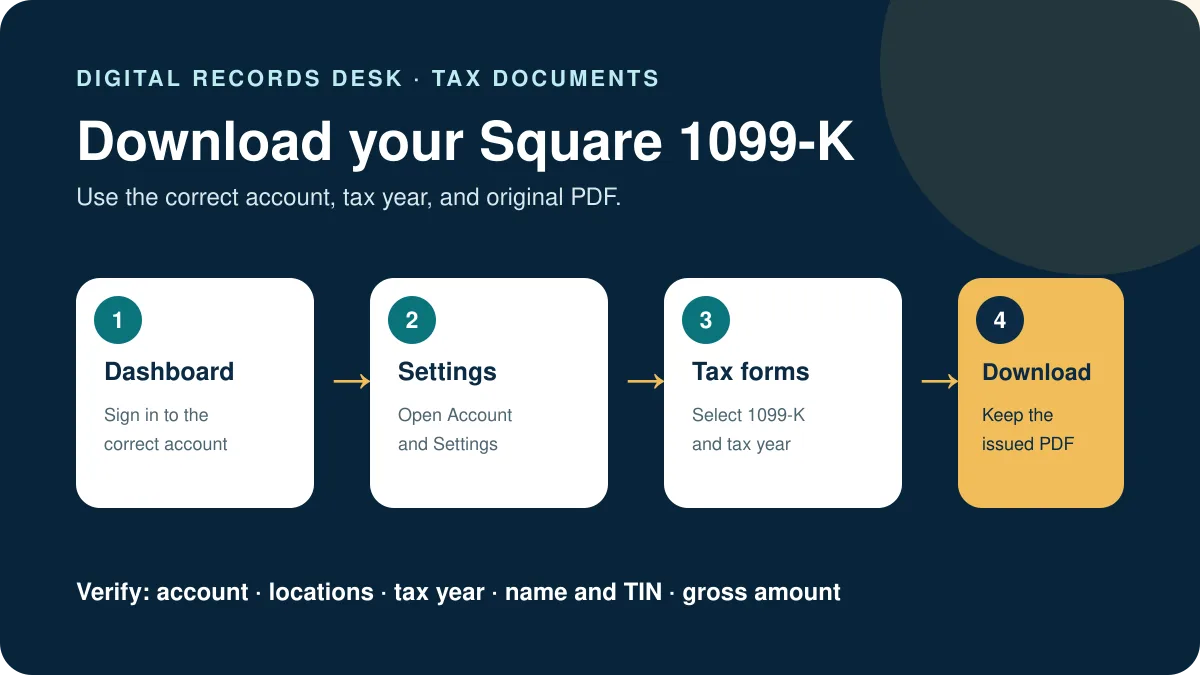
How to download Square Form 1099-K
- Sign in through the official Square Dashboard.
- Select Account & Settings.
- Open Tax forms.
- Choose the correct tax year and Form 1099-K.
- Download and save an untouched copy.
Square says forms for an applicable tax year are made available by January 31 of the following year, or the next business day when that date falls on a weekend or holiday.
What to review before using it
| Field | Compare with | Why |
|---|---|---|
| Name and TIN | Square taxpayer settings | Mismatches can require correction |
| Gross amount | Square payment and reconciliation reports | Gross volume is not net profit |
| Tax year | Requested filing period | Each form covers one year |
| Account | Your Square locations and ownership records | Separate activity can require separate review |
Why no 1099-K appears
Square states that an unavailable form usually means the account did not qualify based on its activity. Also confirm the year, correct Square account and Tax Forms tab. Do not assume that the absence of a form eliminates recordkeeping or tax obligations; rules and state thresholds can differ.
When reconciling eligibility or amounts, collect Square payment reports for the full calendar year and separate gross processed payments from transfers to your bank. Deposits can be lower because of processing fees, refunds, disputes, reserves, or timing. Use report totals as supporting records; do not replace the filed form with a spreadsheet total.
If you operated more than one location, changed business ownership, or used more than one Square account, confirm which activity and taxpayer identity each form covers. Combining unrelated accounts before that check can hide a genuine discrepancy.
Correct taxpayer details or a form
Square permits taxpayer-information updates in Dashboard and provides correction options for eligible prior forms. Updating a TIN does not guarantee that every earlier form can still be corrected because time limits can apply. Use Square’s form-specific process and retain both versions.
Reconcile the Square 1099-K amount
Create a control sheet with the Square account, taxpayer ID ending, tax year, form amount, full-year processed-payment total, locations, and export dates. Compare the form with gross payment activity first—not with net bank transfers. Use identical calendar-year boundaries and the Dashboard timezone.
- Save the original 1099-K and a broad full-year transaction export.
- Confirm that every relevant location and payment source is included.
- Group payment activity by month and compare it with the form’s monthly amounts when available.
- Separate refunds, disputes, fees, cash payments, and transactions handled by another processor.
- Document each remaining difference with transaction or support references.
Suppose Square processed $28,000 in qualifying card payments but transferred $26,100 to the bank. The deposit difference may reflect fees, refunds, disputes, reserves, or year-boundary timing. It does not justify editing the form or the source export.
Locations, accounts, and ownership changes
A business can have multiple locations inside one Square account or activity split across separate accounts. Record which locations and taxpayer identity the form covers before combining reports. If ownership changed during the year, keep the old and new entities separate and obtain professional guidance where classification is unclear.
Before deactivating an account, download tax forms, transaction detail, transfer records, and monthly summaries for every required period. Open each file once, confirm it is complete, and store it in a folder labeled with the account and year. Later access can be harder than collecting the records while the account is active.
Preserve the correction trail
If Square issues a corrected form, retain both PDFs and note the support case, request date, correction reason, and final version used. Do not rename the corrected file as though it were the original. Share only the necessary document through an approved secure channel and redact working copies rather than the issued form.
Use consistent filenames that identify the Square account, tax year, document type, and version. A small readme inside the year folder should explain which form is current and why another version remains archived.

Frequently asked questions
When is Square 1099-K available?
Square says by January 31 after the tax year, adjusted to the next business day when necessary.
Why is the amount higher than deposits?
The form reports gross qualifying payments and may not subtract fees, refunds, chargebacks or expenses.
Can I download it after deactivation?
Square recommends exporting forms and records before deactivating because access can be lost.
Can Square correct my name or TIN?
Use Dashboard taxpayer settings and the available 1099-K correction workflow; prior-year limits may apply.
Routes and material facts were checked on August 29, 2026.