Source workflow verified: August 29, 2026
Cash App offers several records rather than one universal export: account statements, transaction history or personal-data downloads, card activity CSV files, and Bitcoin transaction records. Choose the record that matches the request.
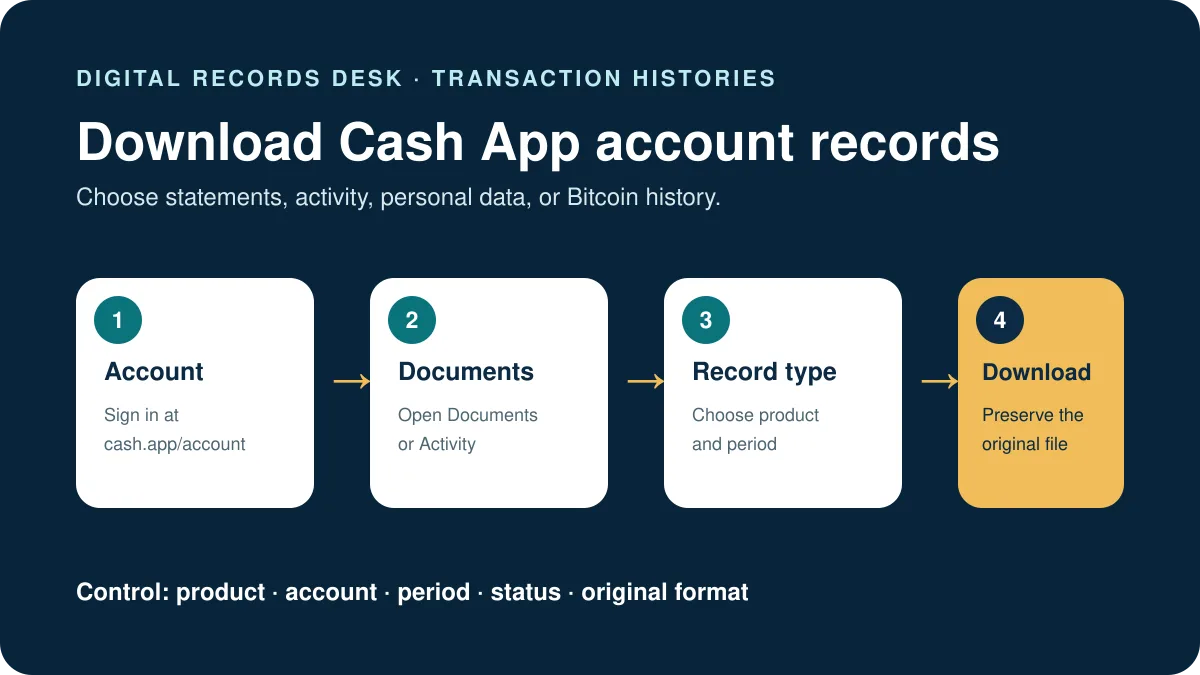
Choose the correct Cash App record
| Record | Best for | Important distinction |
|---|---|---|
| Account statement | A readable periodic account record | Not necessarily a machine-readable import file |
| Transaction history or personal data | A broader account-data archive | May differ from a single statement period |
| Activity CSV | Spreadsheet review of supported activity | Filters and product scope affect rows |
| Bitcoin transaction CSV | Bitcoin recordkeeping and supported tax workflows | Does not replace non-Bitcoin records |
How to download Cash App account statements
- Go directly to cash.app/account and sign in.
- Select Documents in the left menu.
- Open Account statements.
- Choose the required statement period.
- Download it and check the account, opening date, and closing date.
Use statements when a bank, accountant, or record request needs a stable month-by-month document. If the recipient requests CSV, confirm which Cash App export it accepts rather than converting a statement automatically.
How to download Cash App CSV records
Personal information and transaction history
Cash App’s privacy guidance says customers can access and download personal information, including a CSV, and view or download transaction history through Cash App’s account tools. Follow the current on-screen route for your account and review the archive contents before sharing.
Card activity
In supported Activity views, select the CSV control to the right of the search bar. If you filtered activity first, document those filters because they can explain a shorter export.
Bitcoin transactions
Open the profile area and choose Documents; on desktop, use the official Cash App website. Download the available Bitcoin transaction CSV and compare its time span with the period requested.
If you only need a tax form for a business account, use our separate guide to download a Cash App 1099-K.
If transactions are missing
- Confirm that you selected the right statement month or export date range.
- Remove Activity filters and create a broader working export.
- Check whether the transaction belongs to Cash App Card, Bitcoin, or another product view.
- Compare pending, completed, refunded, and voided activity carefully.
- Make sure you signed in to the correct Cash App account.
Keep the first download untouched. Spreadsheet programs can reformat dates, long identifiers, and amounts, so troubleshoot only a duplicate.
Verify that the Cash App record set is complete
Create an inventory with the Cash App account, product, record type, selected period, timezone, row or page count, earliest date, latest date, and download time. This distinguishes a missing transaction from a file that simply covers a different product or statement month.
- Keep account statements, Activity CSV, personal-data history, Cash App Card activity, and Bitcoin records clearly labeled.
- Compare several completed, refunded, reversed, or pending transactions with the Activity screen.
- Check adjacent dates when a transaction sits near a month or timezone boundary.
- Use transaction identifiers instead of matching amounts to investigate duplicates.
- Confirm that a connected accounting service has not already imported the same activity.
Reconcile statements, exports, and transfers
A monthly statement, broad data archive, and product-specific CSV can contain different rows and date logic. Do not force their totals to match by editing source files. Use a separate reconciliation sheet to bridge completed payments, refunds, fees, Bitcoin activity, Cash App Card entries, and bank transfers.
Store untouched originals by account, product, and year. Create a redacted copy only after confirming what the accountant, lender, or dispute reviewer needs. Record every filter or transformation so the working result can be reproduced without exposing the full private history.
Open every downloaded file before relying on it, confirm its first and last page or row, and use filenames that distinguish original, working, redacted, and import-ready versions.

Frequently asked questions
Can I download Cash App history as CSV?
Cash App documents supported CSV downloads for personal information, certain Activity records, and Bitcoin transactions. The available route depends on the record type.
Are statements the same as transaction history?
No. A statement is a periodic readable record; transaction-history and CSV exports can provide different scope and structure.
Why is a payment absent from my CSV?
The export may use a different product view, date range, status, or filter. Create an unfiltered copy and compare it with the app’s Activity view.
Does the Bitcoin CSV include regular Cash App payments?
No. Treat the Bitcoin record as product-specific and collect separate statements or history for other activity.
- Cash App: view account statements
- Cash App: access personal information
- Cash App: Bitcoin tax records
Routes and record types were checked on August 29, 2026.